Comparison
Zulu and Google Calendar.
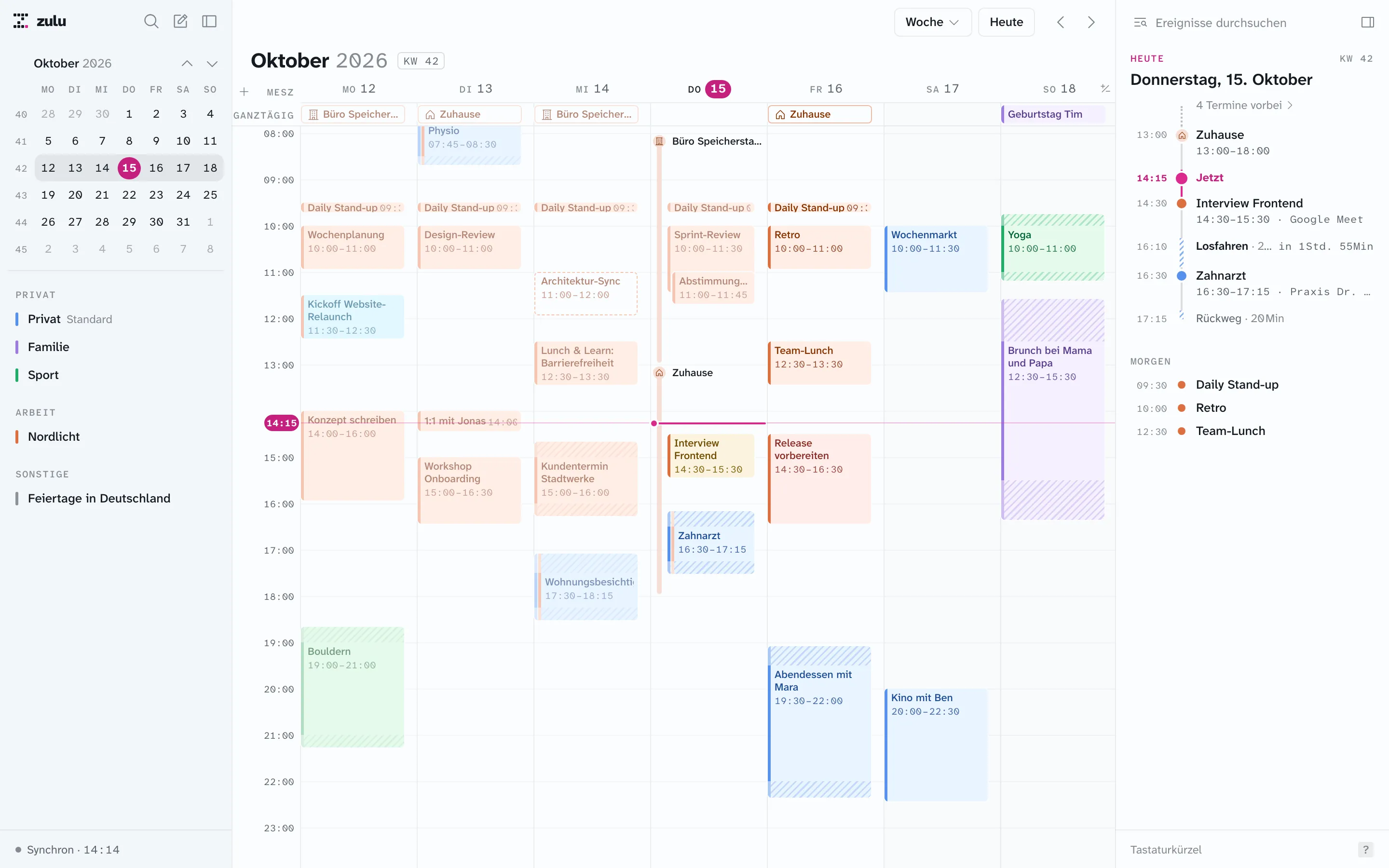
Zulu isn’t a second calendar but another door to your Google calendar: a Mac app you drive with the keyboard, an iPhone app with a full week, and a service that maintains travel time and blockers. Everything you do in Zulu lands in Google. Everything you do in Google shows up in Zulu.
As of:
What stays in Google
Your events, calendars, sharing, and accounts. Zulu keeps no copy of its own that could drift apart; it reads through the Google Calendar API and writes back through it. Google stays the source of truth, including for things Zulu can’t do:
- Creating recurring events and changing recurrence rules. Zulu shows series and edits single occurrences, “from this one on,” or the whole series, but doesn’t create new recurrences.
- Reminders, tasks, appointment schedules, sharing calendars, email notifications.
- Everything on Windows, Android, and in the browser. According to Google, Google Calendar is available in the browser and on Android, iPhone, and iPad; Google doesn’t offer a Mac app of its own.
What Zulu adds
| Google Calendar | Zulu | |
|---|---|---|
| App on the Mac | Browser | Native app, keyboard controls like Notion Calendar |
| Travel time | No feature of its own; add an event before by hand | There and back on the event, appears in Google as an event, moves along |
| Occupying your work calendar with personal events | Share calendars between accounts, also as “free/busy” only. That shows you both in one view; no event is created in the work calendar itself | A rule creates real blockers in the work calendar that colleagues see as busy; no details, only within the time window |
| Day route and time to leave | No | Route of the day on the Mac, notification and widget on iPhone |
| Multiple Google accounts | Yes, switchable or combined in the app and browser | All calendars of all accounts in one list, grouped as personal, work, other |
| Working location | Only for eligible Workspace accounts, not for personal Google accounts | Shows and creates Google’s working locations (same restriction); copies them into the personal calendar by rule |
| Week on iPhone | Yes | Seven days on one screen without scrolling, focus column with a tap |
| Create an event as free text | In the browser via “Create” | Quick entry with travel time, location, and calendar in the text, with a preview of conflicts |
| Month view | Yes | iPhone only |
What others see in Google
Everything Zulu creates is an ordinary Google event. A travel time is called “⏳ Wegzeit,” a blocker “Blockiert” (or whatever you name it) and is private. Anyone who sees your calendar in Google Calendar or Outlook sees that you’re on the road or busy, without needing Zulu. If you stop using Zulu, these events remain and can be deleted in Google.
How Zulu gets to your calendar
You connect each Google account once through Google sign-in (OAuth) with the permission for Google Calendar. The Zulu backend keeps a cache for 30 days back and 180 days ahead and receives changes from Google via push; as a safeguard it also polls every minute. You can revoke access in your Google account at any time. More under Your data.
Questions
Is Zulu a Google Calendar app for the Mac?
Yes, in the sense that it only shows and edits Google calendars. It needs the Zulu backend, which is connected to Google on your behalf.
Can I keep using Google Calendar?
Yes, in parallel and at any time. Both show the same data. You’ll still need Google Calendar for recurrences, reminders, and sharing.
Does it work with a Google Workspace account?
Yes, provided your organization allows access by apps. Working locations and out of office exist only where Google offers them.
Sources
Details on Google Calendar from these pages, retrieved on October 17, 2026. Google Calendar and Google Workspace are trademarks of Google LLC.
- Get Google Calendar: platforms (computer in the browser, Android, iPhone and iPad)
- Working location enabled by default: working location only for certain Workspace plans, not for personal accounts (Google Workspace Updates, 2022)
- Help community: “I can’t set travel time in calendar”: no travel time feature in Google Calendar (2023)