Comparison
Zulu and Notion Calendar.
Zulu grew out of one question: what does Notion Calendar lack for people who only use Google Calendar? Travel time, blockers with rules, and an iPhone app with a full week. We kept the controls on purpose. Much of what Notion Calendar does beyond that, Zulu doesn’t. Here’s both side by side.
As of:
In three sentences
- Switching to Zulu makes sense if you only use Google calendars, keep personal and work events apart, and want travel time, blockers with a time window, and a full week on iPhone.
- Stay with Notion Calendar if you need Notion databases in your calendar, send scheduling links, have iCloud or Outlook calendars, use Windows or Android, or want several time zones side by side.
- Both work in parallel. Zulu only writes to Google. Travel times and blockers appear in Notion Calendar as regular events.
Features compared
| Notion Calendar | Zulu | |
|---|---|---|
| Calendar providers | Google Calendar, Apple iCloud, Outlook | Google Calendar only, any number of accounts |
| Platforms | Web, Mac, Windows, iOS, Android | Mac (Apple Silicon) and iPhone |
| Travel time on events | Not mentioned in help or product page | There and back separately, as an event in Google, once for a series |
| Blocking in another calendar | A single event or all events from a calendar, as “busy” or with details | Rules with time window, gap threshold, travel time, out of office that declines; manual per event; never with details |
| Day route with time to leave | Not mentioned | On the Mac, on iPhone with a notification, as a widget |
| Out of office and working location (Google) | Out of office and focus time on desktop, not in the mobile app; working location not mentioned in the help | Show and create both; copy working locations into the personal calendar by rule |
| Views on the Mac | Day, week, month | Day, 2 to 9 days, week. No month view |
| Views on the phone | 1 to 3 days; week, month, agenda on desktop only | Seven-day week, focus column, day, month |
| Editing and search on the phone | No search; editing only for events created on iOS | Edit everything, search, free-text quick entry |
| Keyboard shortcuts | Yes, customizable | Yes, largely the same, not customizable |
| Command menu | Yes | Yes (⌘K) |
| Notion databases in the calendar | Yes | No |
| Scheduling links | Yes | No |
| Multiple time zones | Yes | No, only the computer’s time zone |
| Create recurring events, set reminders | Yes | No, use Google Calendar for that; Zulu shows and edits existing series |
| Mac menu bar | Yes, with countdown | No |
| App language | 12 languages, including English | German |
| Price | Free | Invite only for now, no price set |
| Where the logic runs | At Notion | Own backend: run by us or self-hosted |
What feels the same
The week, the panel on the right, the sidebar with calendars, the command menu, and the shortcuts: C for a new event, T for today, J and K for weeks, N and B for the next and previous event, ? for all shortcuts. Dragging snaps to 15 minutes, to full hours with ⌥. If you know Notion Calendar, you don’t need a manual. The full list is under Keyboard shortcuts.
The look has been Zulu’s own since October 2026: Atkinson Hyperlegible, a restrained interface, color reserved for events. Light and dark.
What Zulu does differently
Blocking by rule instead of wholesale
Notion Calendar blocks all events from a calendar, or a single one. Zulu blocks by rule: only Monday to Friday from 8 to 6, small gaps included, travel time counted, optionally as out of office that declines invitations. Single events can be excluded. Details never reach the work calendar. More under Blocking.
Travel time that Google sees
Zulu creates an event in Google for every travel time. That’s why the time on the road is blocked in every app, including Notion Calendar if you keep using it. More under Travel time.
The whole week on iPhone
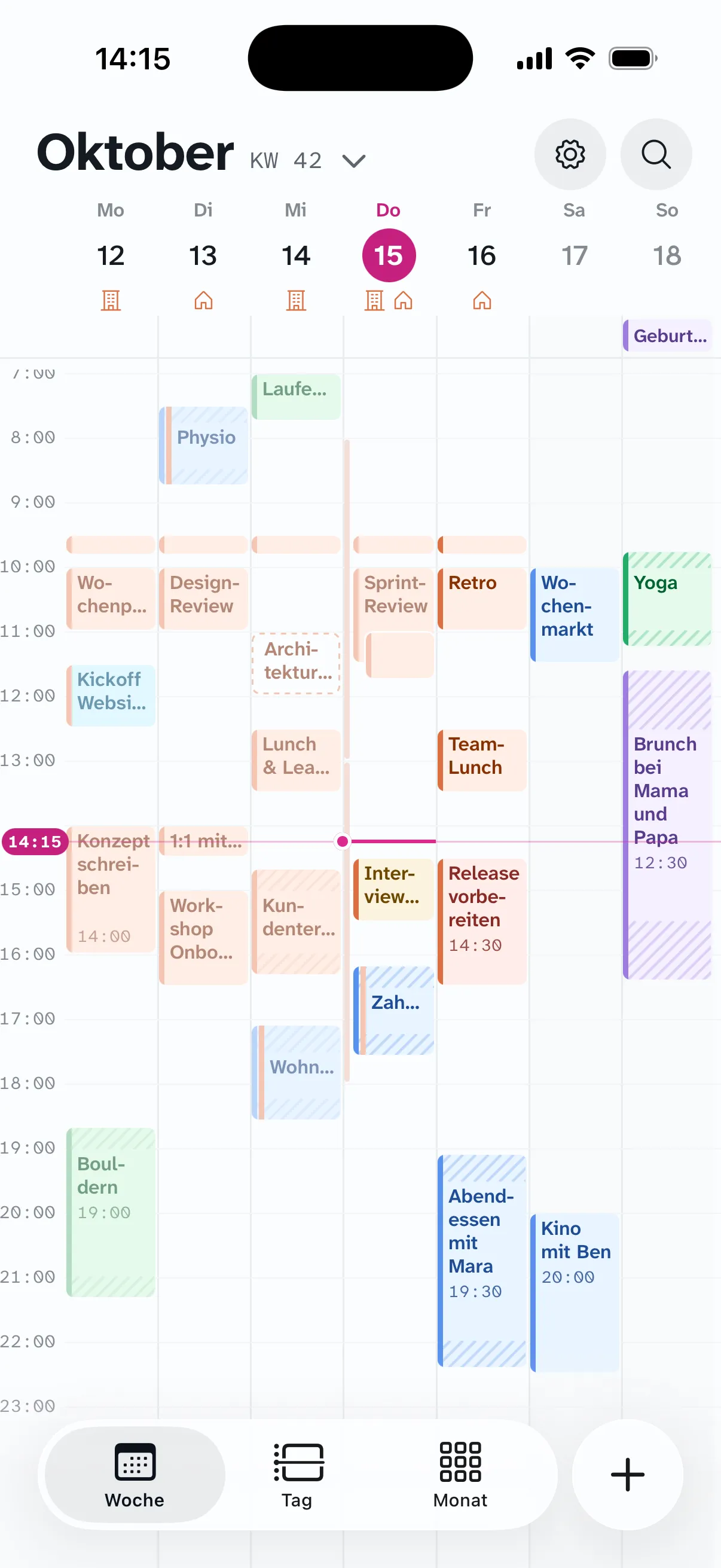
Notion Calendar shows one to three days on the phone. Zulu shows seven without scrolling; a tap on a day widens it. Plus month, search, free-text quick entry, and the “time to leave” notification.
What Zulu doesn’t have
Some of this is planned (the groundwork for Android is in place, English is coming), some deliberately not (Notion integration, other calendar providers). What just landed is under What’s new.
Switching
There is nothing to import. Both apps show the same Google calendars. You connect your Google accounts to Zulu, create a blocking rule, and add travel time to the events where you miss it. If you have auto-blocking active in Notion Calendar, turn it off for the same calendar pairs, or you’ll get two blockers. Step by step under Setup.
Sources
The statements about Notion Calendar come from these pages, retrieved on October 17, 2026, and from our own use of the Mac app (recurrences, reminders). Notion and Notion Calendar are trademarks of Notion Labs, Inc. If something has changed, let us know.
- Notion Calendar apps: platforms and limits of the mobile app
- Blocking: blocking single events and whole calendars
- Notion Calendar product page: calendar providers, price, features
- Getting started with Notion Calendar: shortcuts, time zones, menu bar
- Notion Calendar on the App Store: languages