Feature
Personal events block your work calendar. Without the details.
Two Google accounts, one life: the dentist is in your personal calendar, your colleagues plan around your work calendar. Zulu creates a blocker there whenever a personal event falls into working hours. What’s behind it stays private.
As of:
One rule per pair of calendars
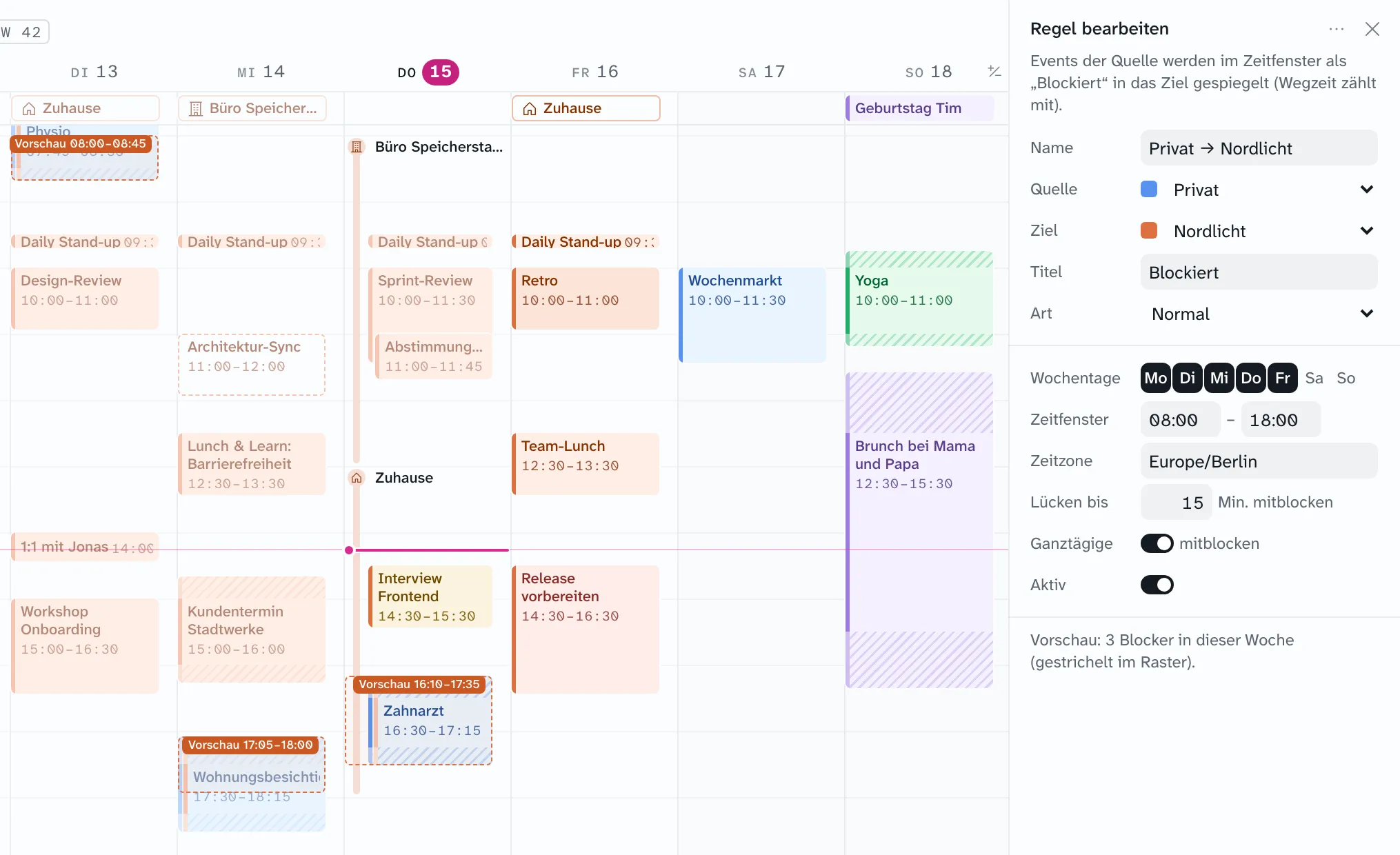
A rule says: events from this calendar block that one. Personal → work is typical; club → work or work → personal work the same way. You create rules on the Mac under Settings (⌘,) › Rules › “Neue Regel” (new rule). While you edit, the week grid shows dashed previews of the blockers that would be created, before anything is written.
| Setting | What it does | Example |
|---|---|---|
| Time window | Weekdays and hours in a fixed time zone. If an event only partly overlaps, the blocker is cut at the window. | Mon–Fri, 8 AM–6 PM, Europe/Berlin; dentist 5–7 PM gives a blocker 5–6 PM |
| Gap threshold | If two events are closer together than the threshold, the gap is blocked too. One block instead of three. | 15 minutes |
| All-day events | Only count if the rule explicitly allows it. | A day off in the personal calendar blocks the whole work day |
| Title | The name of the blocker in the target calendar. | “Blockiert” (default), “Private,” “Do not disturb” |
| Kind | Regular event, or out of office that automatically declines new invitations. Out of office only works in the primary calendar of the target account, because Google only supports it there. | Out of office with “decline only new conflicts” |
Not every event counts. Cancelled events, declined and still unanswered invitations, and events marked “free” are skipped. Events you created yourself and “maybe” count.
What appears in the work calendar
In Google, a blocker is an ordinary private event with the title from the rule. No location, no description, no attendees, no reminder. Anyone who sees your work calendar in Google Calendar or Outlook sees: busy. Nothing more.
- Travel time counts as part of the event. The blocker covers the trip there, the event, and the trip back.
- Move the personal event and the blocker moves. Delete it and the blocker disappears.
- If someone edits the blocker in Google, Zulu resets it on the next run. If someone deletes it, it is recreated. The source of truth is your personal event.
- The Zulu service does all of this in the background. No device needs to be on.
Exceptions and manual blocking
Every event panel has a row Blockiert in … (blocked in). A click opens the list of all calendars Zulu may write to.
- Exclude: A calendar where a rule blocks the event shows a check mark with the rule’s name. One click takes the event out of all rules, another brings it back. For one occurrence, the whole series, or from a certain occurrence on.
- Block by hand: A click on another calendar blocks the event there, regardless of time window and rules, always including travel time. If a rule blocks the same calendar, the manual blocker replaces the rule’s; there is never a duplicate.
- All-day events can’t be blocked by hand, only by rule.
On iPhone, the event sheet has the same “Blockiert in” row, where you can also exclude and block by hand. Creating rules is Mac only for now.
And in Notion Calendar?
Notion Calendar also has a blocking feature: put a single event or all events from a calendar onto another calendar, either as “busy” or with details. We didn’t find a time window, a gap threshold, or travel time in Notion’s help on it (as of October 17, 2026). More in the comparison with Notion Calendar.
Questions about blocking
Can my team see what’s behind a blocker?
No. The blocker only carries the title from the rule and is private. The title, location, and notes of your event never leave your personal account.
Do both accounts need Zulu?
Both Google accounts have to be connected to Zulu, because Zulu writes into the target calendar. Colleagues need nothing; they see the blocker as a regular event.
Can I control which calendars Zulu writes to at all?
Yes. During setup, the writable calendars are defined. All others are read-only for Zulu, rules included. More under Your data.
Does this work with a company Google Workspace account?
Yes, if you’re allowed to connect the account to Zulu and the work calendar is writable. Some administrators restrict which apps may access calendars; then Zulu depends on IT allowing it.